Data for ATLAS have been encrypted in a tarball and are available for download directly from NITRC or from an Amazon Web Services S3 bucket.
Direct Download
Please click here to download ATLAS raw data from NITRC (8.2 GB).
Please click here to download ATLAS preprocessed data from NITRC (14.8 GB).
Cyberduck
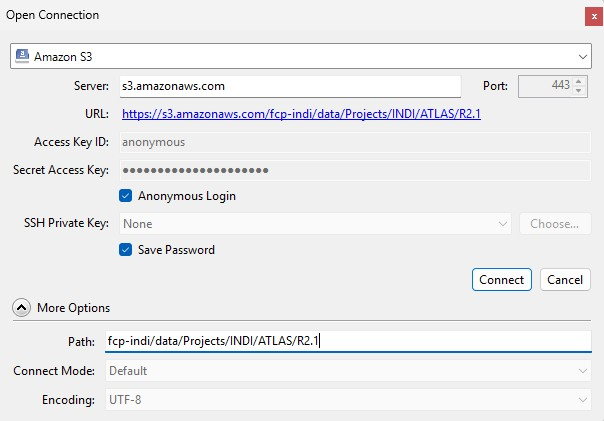
- Open (Cyberduck) and click on Plus sign on the bookmark page.
- Set the application protocol in the dropdown menu to Amazon S3 (Amazon Simple Storage Service).
- Set the server to s3.amazonaws.com.
- Enter the Access Key ID: anonymous.
- Expand the More Options tab and set Path to fcp-indi/data/Projects/INDI/ATLAS/R3.0.
- Close the window.
- Right-click the generated bookmark and click Connect to server.
Once the data is downloaded, using the terminal, change the directory to the folder where you downloaded the files and decrypt the tar.gz files using one of the following command:
OpenSSL:
openssl aes-256-cbc -md sha256 -d -a -in atlas3_training_raw.tar.gz -out ATLAS_R3.0_raw.tar.gz
openssl aes-256-cbc -md sha256 -d -a -in atlas3_training_preprocessed.tar.gz -out ATLAS_R3.0_preprocessed.tar.gz
You will be prompted to enter a password.
In order to obtain this password, please complete a brief Google form. Your completed application will be reviewed, and an encryption code to access the data will then be emailed to you. Please note that this process should be completed for each individual accessing the data, and the encryption code should not be shared with others.